
BackendSide sFlow Collector & Analyzer
Enterprise-Grade Network Traffic Analysis for Windows. Transform your network visibility with a professional, high-performance monitoring solution that turns raw sFlow v5 data into actionable intelligence. Version 4.0 adds adaptive traffic baselines, an expanded flood, amplification and anomaly detection catalogue, email alerting, a live desktop control panel and HTTPS by default — built for IT professionals, network engineers, and security analysts.
Download Desktop Version 4.0

Key Features
- 📊 Advanced Traffic Analytics: Multi-dimensional traffic analysis with top talkers, protocol distribution (TCP/UDP/ICMP), conversation pairs, application port mapping, and VLAN-aware monitoring across configurable time windows (5m, 15m, 1h, 1d)
- 🛡️ Layer 2 Security Dashboard: Full ARP monitoring suite — spoofing detection, MAC flapping alerts, duplicate IP detection, scan detection, vendor fingerprinting, broadcast analysis, retry pattern analysis, and full host history
- 🚨 Flood, Amplification & DDoS Detection: Real-time detection of SYN / ICMP / UDP / ACK / RST / HTTP and fragmentation floods, amplification & reflection (Memcached, DNS, NTP, SSDP, LDAP, SNMP, CharGen), LAND attacks, and port-scan reconnaissance — each with severity tiers and configurable thresholds
- 🧠 Adaptive Baselines & Anomaly Detection: Learns what each agent's traffic normally looks like per hour of the week and scores every minute against it — no thresholds to guess. Ships in learning-only mode so you can review what it would flag before switching it on
- 🔔 Alerting & Email Notifications: A repeating condition is one alert with an occurrence count (not one row per check), with a filterable Alert History, in-app notification bell, and email delivery via custom SMTP, Gmail or SendGrid — with cooldowns, digests and a send-test button
- 📈 Professional Visualization: 30+ pre-built interactive charts and tables with drill-down capabilities, dual Y-axis charts, time-series graphs, heatmaps, and traffic matrix views
- 🏗️ VLAN Intelligence: Per-VLAN traffic summary, inter-VLAN traffic matrix, 802.1p QoS/priority analysis, and time-based VLAN heatmaps for capacity planning
- 🔌 Interface & Host Analytics: Top interfaces by volume, utilization percentage with visual progress bars, VM/virtual interface separation, and a Host Watch page that live-monitors a chosen set of IP and MAC addresses
- ⚡ Enterprise Performance: A lightweight collector handling multiple sFlow agents simultaneously with per-agent isolated databases and a high-throughput ingest pipeline, plus a collector-health heartbeat and anonymous stats endpoint for monitoring headless deployments
- 🔒 Security & Compliance: First-login administrator account with no default credentials, audit-ready logging, CSP-compliant web interface, complete on-premises data control — no cloud, no telemetry
- ⚙️ Flexible Server Configuration: Configurable sFlow collection IP and port (default 6343), a built-in web server with selectable IP/port binding, HTTPS by default on port 8443 with a self-signed certificate generated on first run (drop in your own to replace it), HTTP on 8080, and live restart without data loss
- 🖥️ Live Desktop Control Panel: A rebuilt control panel with custom window chrome and light/dark themes, separate collector and web-server views, an agent list with live traffic sparklines, and one-click start/stop
- 🌐 Browser-Based Interface: No separate client software needed — full analytics accessible from any browser on your network, with session-based authentication and light/dark theme support
Feature Deep Dive
The main dashboard delivers an instant snapshot of your network health with five real-time summary cards and five live charts — all updating automatically as new sFlow data arrives.
- Total Flows — aggregate flow count for the selected time window
- Total Bandwidth — combined bytes transferred across all monitored interfaces
- Top Protocol — dominant protocol (TCP/UDP/ICMP/other) by volume
- Top Source — most active source IP address
- Top Destination — most active destination IP address
Charts include traffic over time, top sources, top destinations, protocol distribution, and top talker pairs — giving you an at-a-glance network picture before drilling into detail pages.
Six dedicated traffic views provide layered analysis from high-level trends down to individual conversation pairs:
- Conversations — ranked source↔destination pairs with byte counts, packet counts, and protocol breakdown; click any pair for flow-level detail
- Top Sources — ranked source IPs by traffic volume with drill-down to per-source destination breakdown
- Top Destinations — ranked destination IPs with drill-down to per-destination source breakdown
- Top Talkers — combined bidirectional view of the highest-volume endpoints on your network
- Protocols — pie and bar charts showing TCP vs UDP vs ICMP vs other protocol distribution over time
- Applications / Ports — port-based application identification mapping common ports (HTTP, HTTPS, DNS, SMTP, RDP, SMB, etc.) to traffic volumes
All views support four time windows (5m, 15m, 1h, 1d) and are selectable per sFlow agent from the dropdown.
Comprehensive VLAN-aware analytics to understand segmentation behaviour and inter-VLAN routing loads:
- VLAN Summary — per-VLAN traffic table showing bytes, packets, flow count, and top hosts for each VLAN ID
- Inter-VLAN Matrix — heatmap matrix showing traffic flows between every VLAN pair, immediately highlighting unexpected cross-VLAN communication
- Priority / QoS — 802.1p priority bit distribution showing how your network uses CoS markings (voice, video, data, control plane traffic separation)
- VLAN Heatmap — time-of-day × VLAN activity heatmap to identify peak usage patterns per VLAN for capacity planning
- Top Interfaces — ranked list of physical and logical interfaces by total bytes, packets, and flow count so you can instantly identify congested ports
- Utilization — percentage utilization per interface with visual progress bars colour-coded green/amber/red, based on observed sFlow rates vs configured interface speed
- VM Traffic — virtual machine / hypervisor interface traffic separated from physical interfaces, useful in VMware/Hyper-V environments that export sFlow from vSwitches
Real-time threat detection built directly into the sFlow pipeline — no separate IDS sensor or SPAN port required. A Threat Overview page summarises everything currently firing, with dedicated pages for each family:
- Flood & DoS — SYN, ICMP, UDP, ACK/RST and HTTP floods, IP fragmentation attacks, and LAND attacks (spoofed identical source/destination). Each indicator lists source→destination, packet counts, last-seen and a severity tier.
- Amplification & Reflection — Memcached, DNS, NTP, SSDP, LDAP, SNMP and CharGen reflectors, with thresholds sized by real-world amplification factor and a reflector→victim table showing response counts and average sizes.
- Port Scan & Reconnaissance — hosts contacting an abnormally high number of distinct destination ports, with a configurable threshold; results show scanner IP, port count, targeted hosts and first/last seen.
- Layer 2 / ARP threats — ARP scanning, spoofing and flooding, MAC flapping and duplicate-IP detection (see the Layer 2 section below).
Instead of asking you to guess a threshold for every network, the anomaly detector learns what each agent's traffic normally looks like — per hour of the week, with an overall baseline as a fallback — and scores every minute against it.
- Learning-only by default — from first run it studies live traffic and records what it would have flagged, without raising alerts, so you can review its findings on the Anomaly Detection page before switching it on under Alert Settings.
- Clear alerts — each states what was observed, what was expected, and by how much they differed, rather than a bare "spike".
- Behavioural views — flow volume per minute, IP-entropy over time (sudden drops or spikes often mean scanning or DDoS), and flows/min against the rolling expected rate.
- Maturity aware — the hour-of-week baselines need roughly two weeks to mature, so on networks with a strong day/night rhythm it is worth waiting before enabling alerts.
- One alert, not one per check — a condition that keeps firing updates an occurrence count and a last-seen time on the existing alert instead of adding a new row every poll. If it worsens, the alert is escalated to the new severity and marked unread again, so real escalations aren't buried.
- Alert History — a filterable log (severity, type, agent, read/unread) with first-seen, last-seen and occurrence counts, and an in-app notification bell that shows the unread count.
- Email notifications — deliver via custom SMTP, Gmail or SendGrid, with a save-and-test button, per-severity cooldowns, digest mode, and per-detector thresholds — all configured on the Alert Settings page.
- Host Watch — pick a set of IP and MAC addresses and monitor them live on their own page, separate from the top-talker rankings.
- Traffic baseline vs. current — plots current bandwidth against a learned baseline band, so at a glance you can see whether the network is inside its normal envelope, with a per-minute deviation table (baseline, actual, deviation and status) beneath it.
- Baseline deviation alerts — surface unusual spikes or drops, highlighting the percentage deviation from normal for fast identification of DDoS ingress or application failures. Thresholds are expressed as deviation scores rather than fixed multiples, so they travel across networks of different sizes.
The most comprehensive Layer 2 analytics suite of any sFlow collector — ten dedicated ARP and MAC analysis views:
- ARP Summary — total ARP request/reply counts, unique MACs, and top ARP-talking hosts
- ARP Top Talkers — ranked hosts by ARP volume to identify misconfigured devices or scanners generating excessive ARP traffic
- ARP Scan Detection — identifies hosts performing ARP sweeps (probing many IP addresses), a common pre-attack reconnaissance technique
- ARP Spoof Detection — detects MAC address conflicts where multiple MACs claim the same IP, or the same MAC claims multiple IPs — classic ARP poisoning indicators
- ARP Over Time — time-series chart of ARP request/reply volume to spot floods or unusual bursts
- VLAN Distribution — ARP traffic broken down by VLAN, showing which segments generate the most ARP overhead
- New MAC Detection — logs every newly-seen MAC address with first-seen timestamp and VLAN, enabling rogue device detection
- Broadcast Analysis — quantifies broadcast traffic per VLAN and per host to diagnose broadcast storms or chatty legacy devices
- Retry Patterns — detects hosts with abnormally high ARP retry rates (unanswered requests) pointing to missing hosts or blackholed traffic
- MAC Flapping — identifies MAC addresses moving between ports/VLANs frequently, indicating a loop, misconfigured bond, or MITM attack
- Duplicate IP Detection — cross-references IP↔MAC bindings to flag IP conflicts on the network
- Host History — full timeline of IP↔MAC binding changes for a given host, invaluable for forensic investigation
- Vendor Distribution — OUI-based vendor lookup showing the hardware manufacturer mix on your network (Cisco, Dell, VMware, Apple, etc.)
BackendSide sFlow Collector automatically discovers and tracks every sFlow-sending device (agent) that contacts it. Each agent is stored in its own isolated database, preventing data mixing and enabling independent retention policies.
- Unlimited agents — all sending to the same collection IP:port
- Per-agent dropdown selector on every analytics page
- Per-agent database stored in your Windows profile — easy to back up or archive individual agents
- 8-hour rolling data retention per agent (configurable in future releases)
Full control over how the collector and web server bind to your network from within the application — no config file editing required:
- sFlow Collection — choose which local IP the UDP listener binds to (all available system IPs are listed), set the collection port (default 6343)
- Web Server — choose IP binding and ports for the built-in server; supports binding to a specific interface or all interfaces
- HTTPS by default — the dashboard runs over HTTPS on port 8443 with a self-signed certificate generated on first run, with HTTP available on 8080. Drop your own certificate and key into the data directory's
sslfolder to replace it — no external tools needed - Live Restart — apply new IP/port settings via the in-app restart button — the collector resumes immediately on the new configuration
🎯 Perfect For
- Network Administrators – Capacity planning, performance optimisation, troubleshooting
- Security Analysts – Threat detection, incident response, forensic investigation
- IT Managers – Network visibility, compliance reporting, resource allocation
- MSPs & Consultants – Multi-tenant ready for client deployments
- Educational Institutions – Teach networking concepts with real data
🌟 Why Choose BackendSide?
- Complete solution – Not just a collector, but a full analytics platform
- Enterprise features – Layer 2 security, DDoS detection, forensic tools
- Professional interface – Clean, intuitive, and responsive dark/light theme
- Active development – Regular updates based on user feedback
- No subscriptions – One-time purchase, lifetime use
- No cloud dependency – All data stays on your Windows machine
✅ Compatible sFlow Devices
Any device that exports sFlow v5 will work with BackendSide sFlow Collector. Tested and compatible with:
- Cisco Catalyst & Nexus
- Juniper EX / QFX / SRX
- Arista EOS switches
- Dell EMC networking
- HP / HPE ProCurve & Aruba
- Extreme Networks
- VMware vSphere vSwitch
- Open vSwitch (OVS)
- Any sFlow v5-compliant device
Software Screenshots
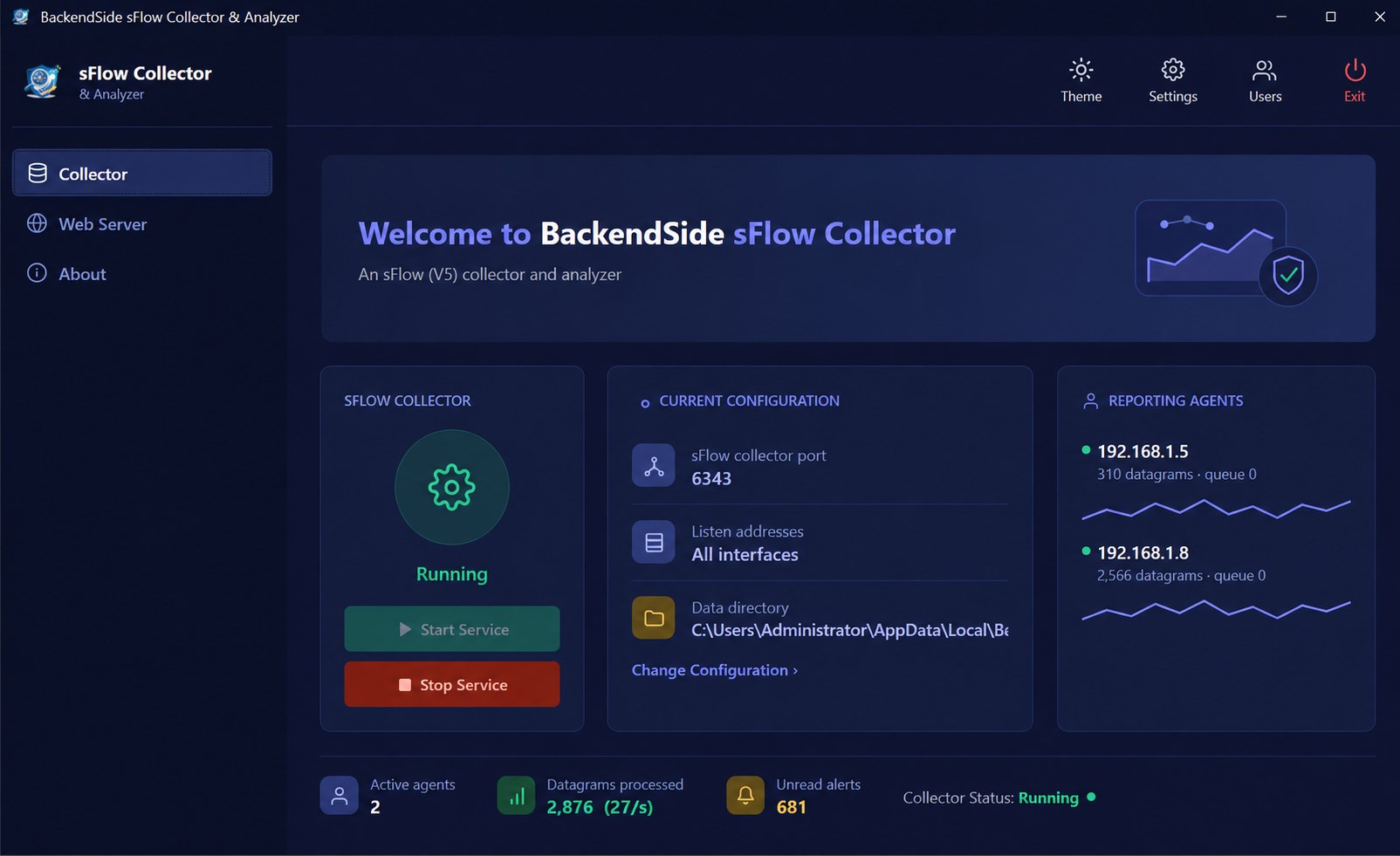
Desktop Control Panel — the sFlow v5 collector running, with live configuration and reporting agents
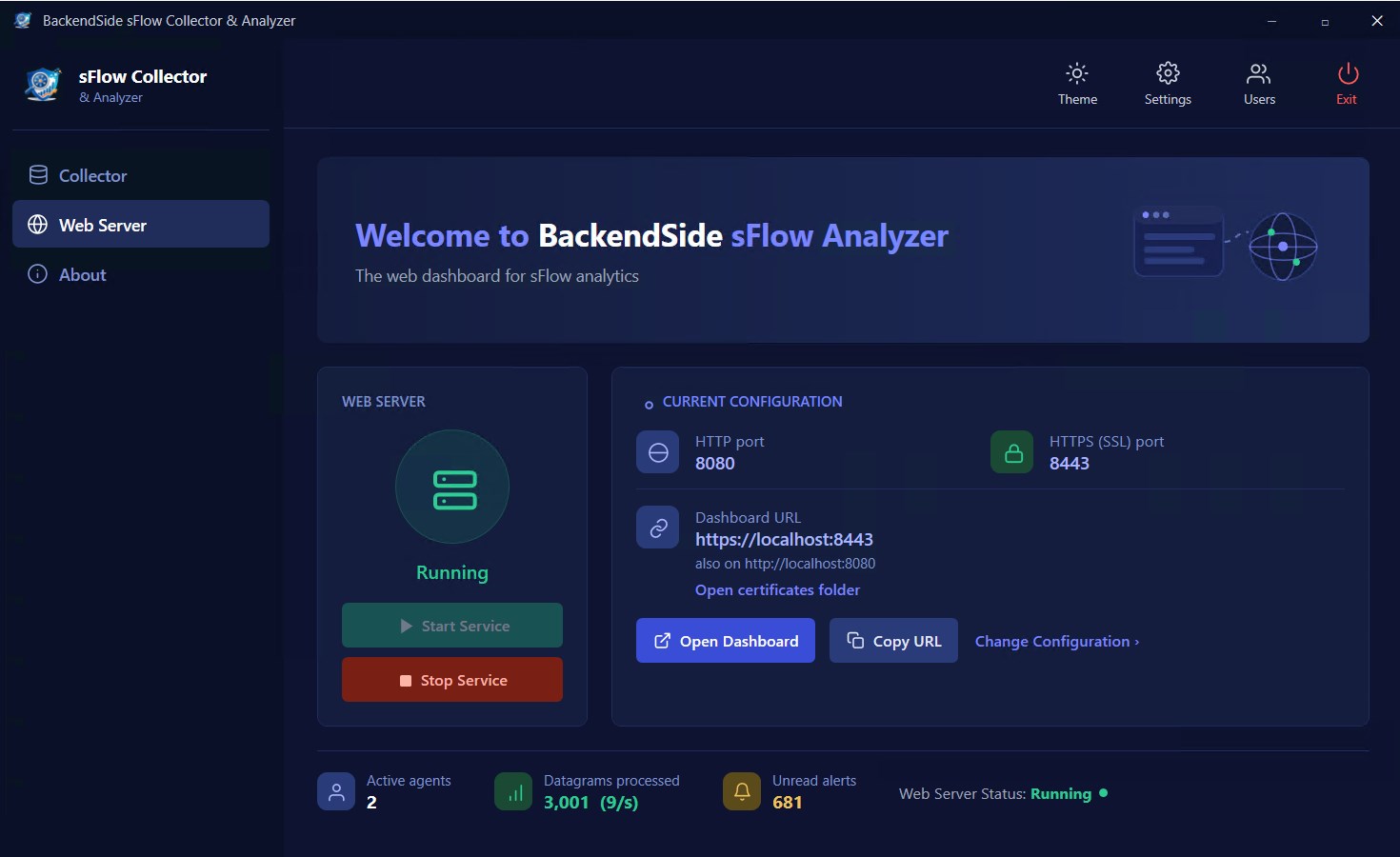
Built-in Web Server — start the analytics dashboard over HTTP or HTTPS in one click
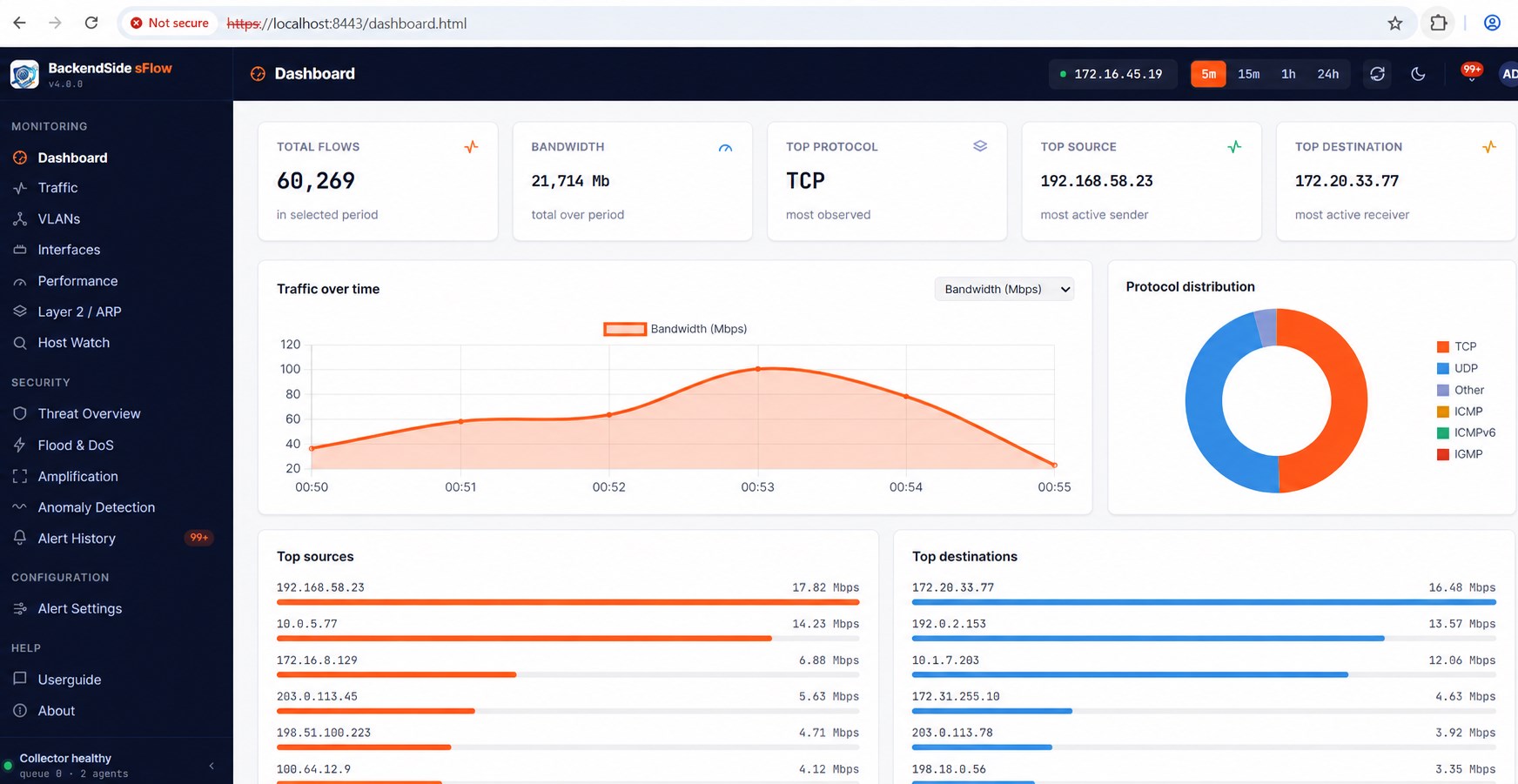
Dashboard — real-time flows, bandwidth, top protocol and top talkers at a glance
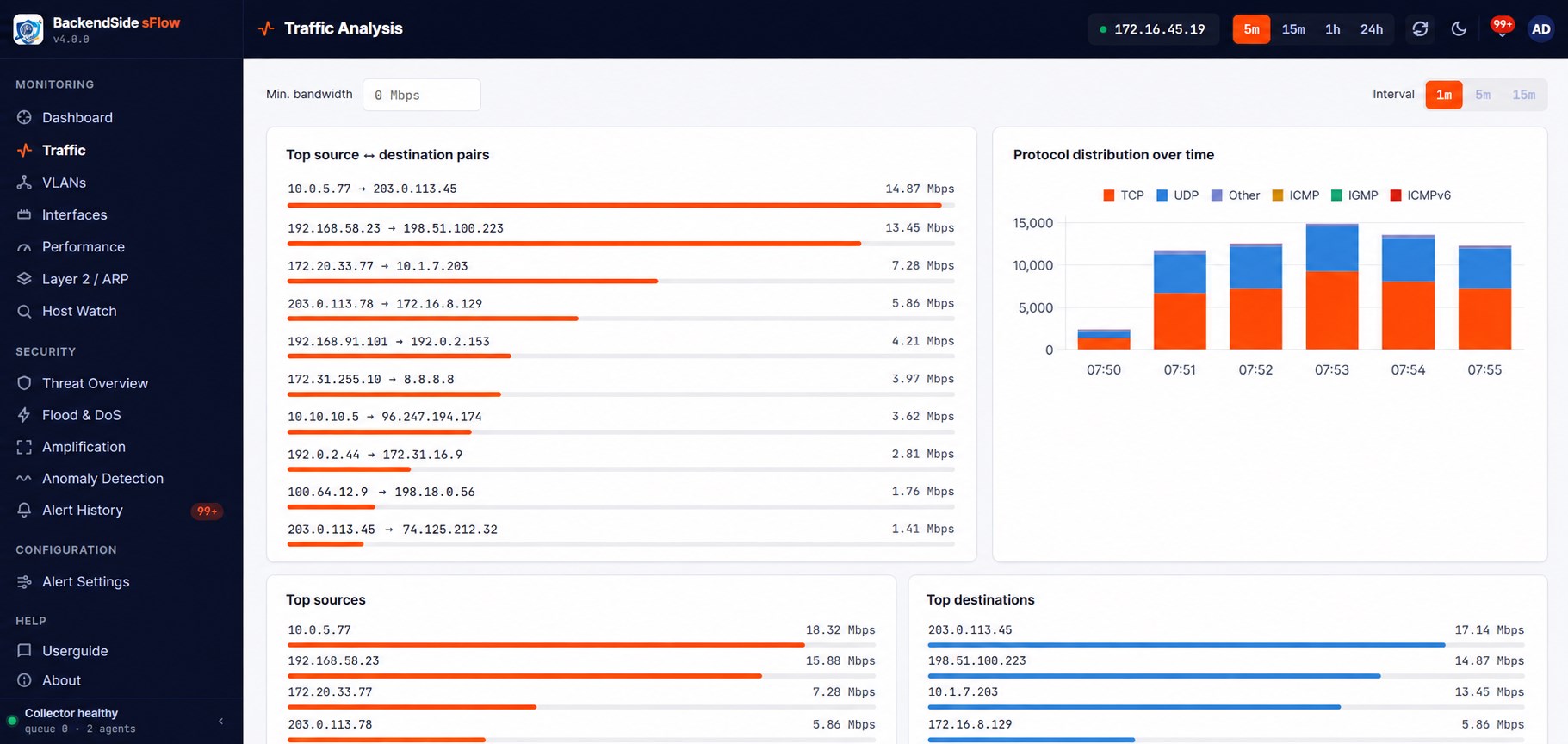
Traffic Analysis — top source/destination pairs and protocol distribution over time
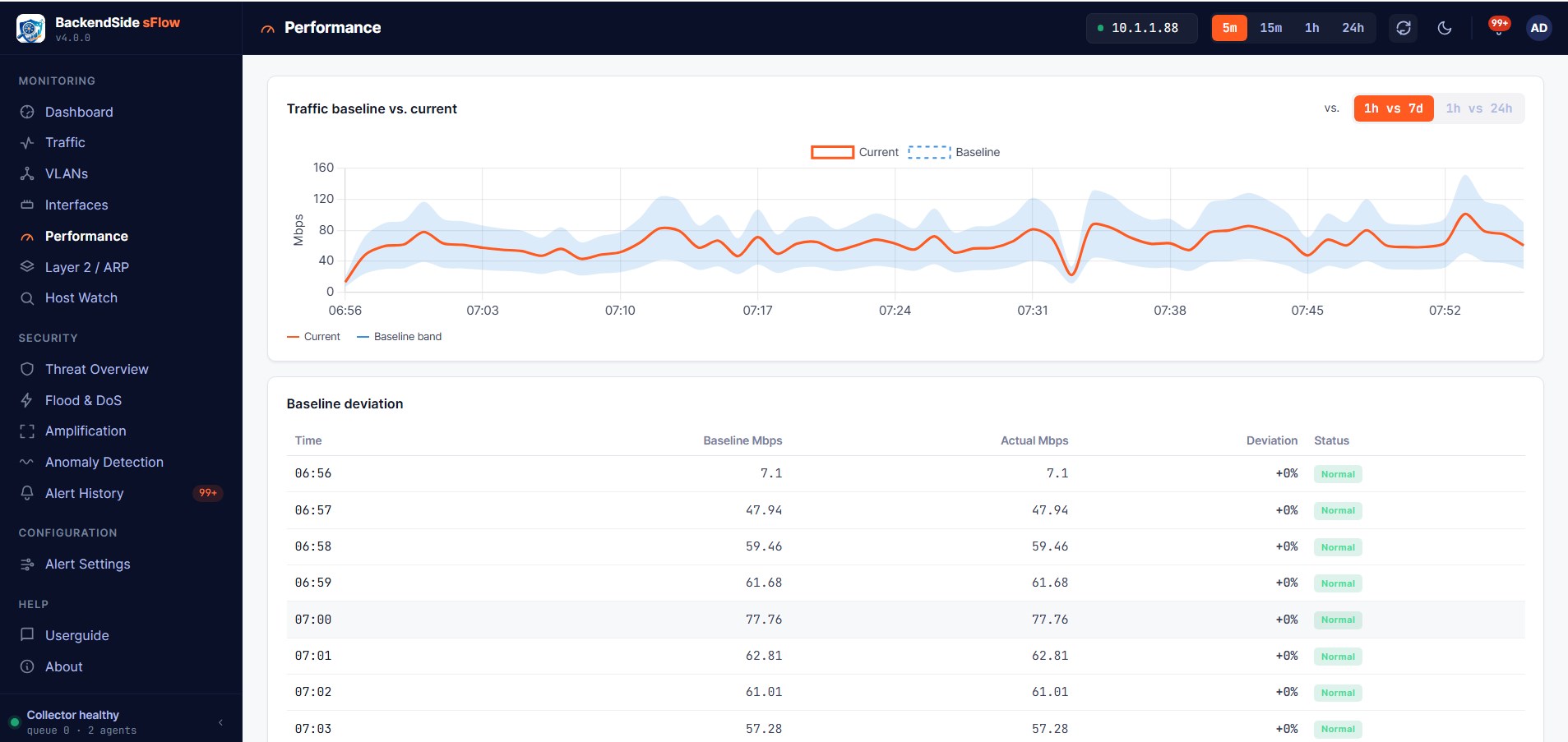
Performance — current traffic against a learned baseline band, with per-minute deviation
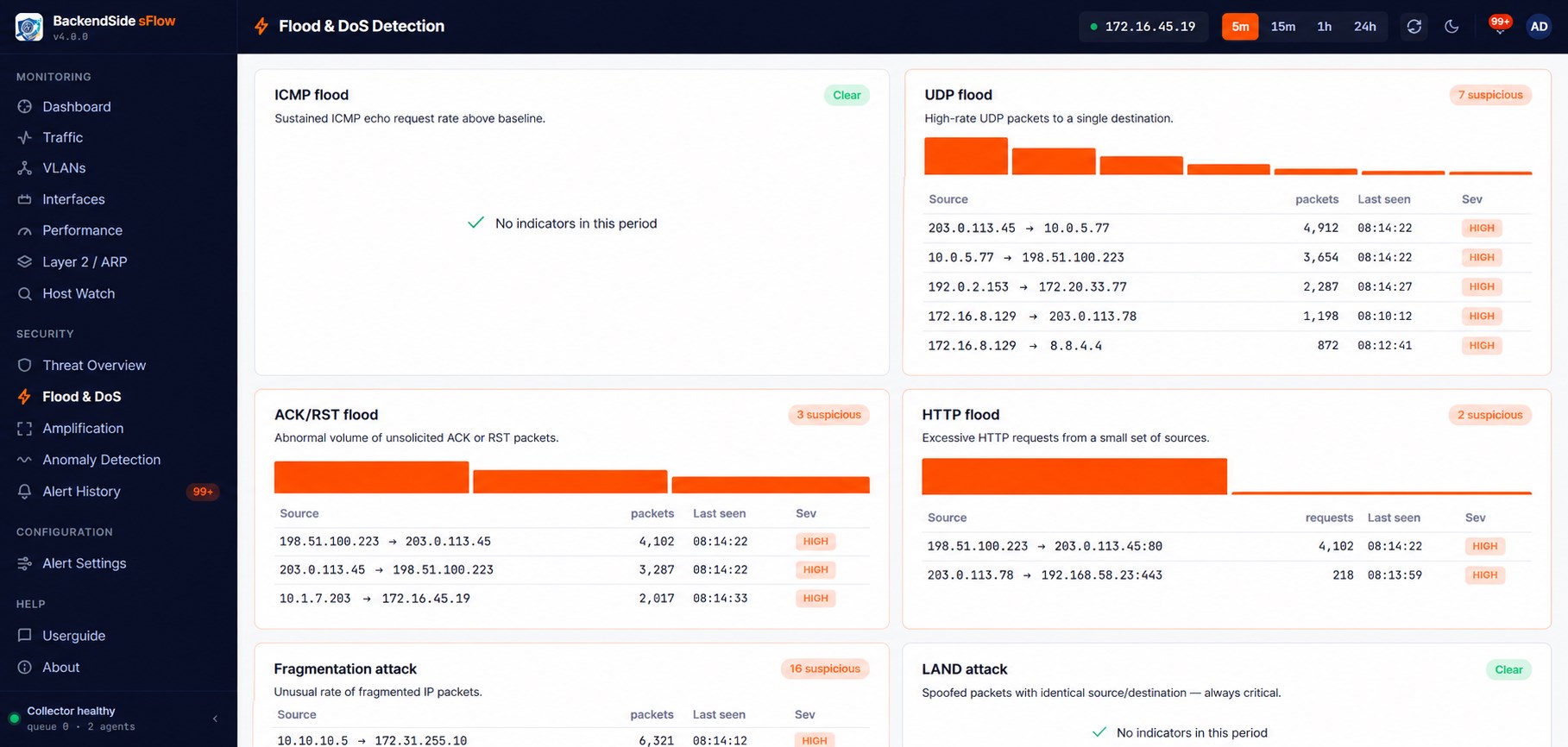
Flood & DoS Detection — ICMP, UDP, ACK/RST, HTTP flood, fragmentation and LAND indicators
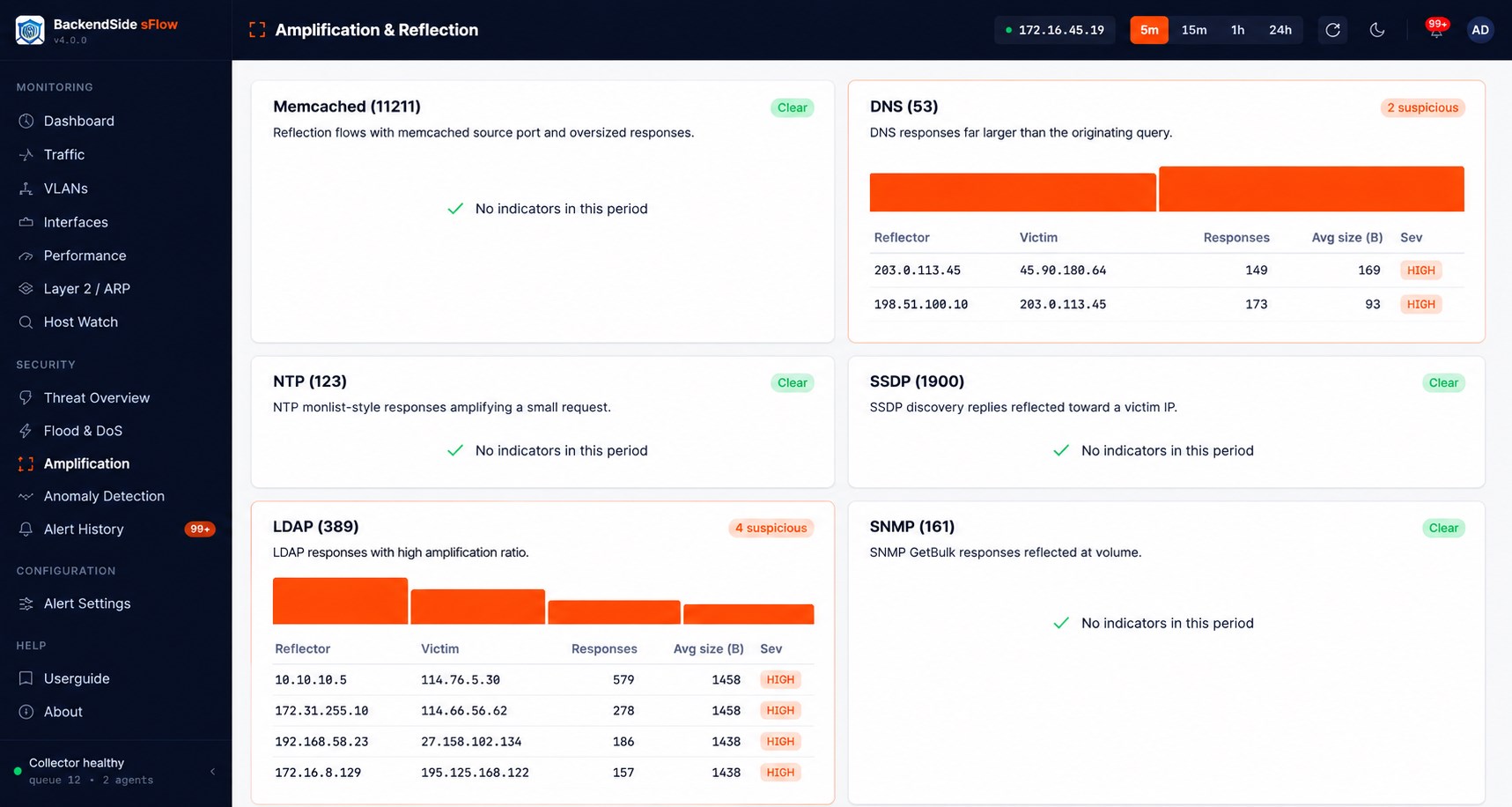
Amplification & Reflection — Memcached, DNS, NTP, SSDP, LDAP and SNMP reflectors
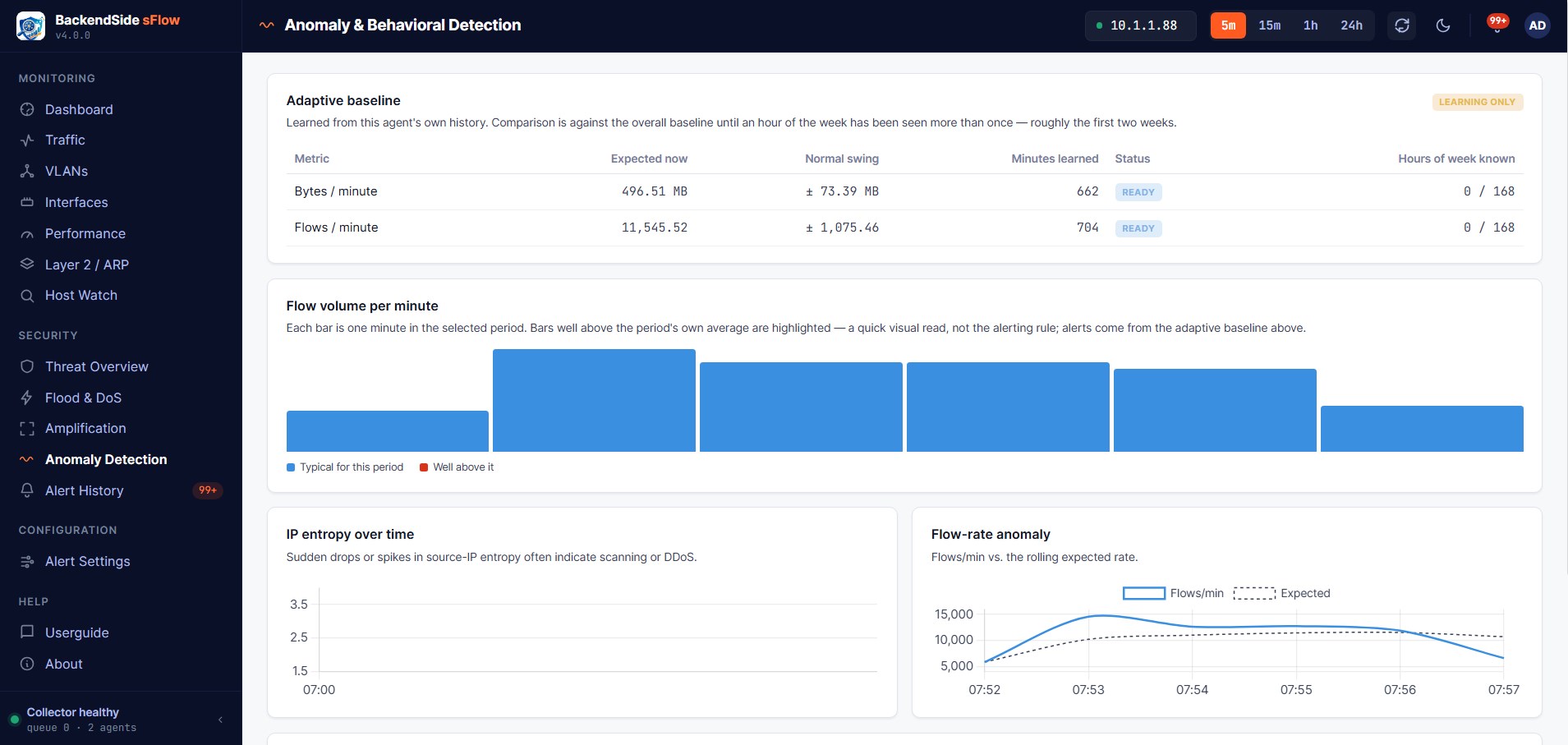
Anomaly Detection — an adaptive per-hour baseline, flow-volume and IP-entropy analysis
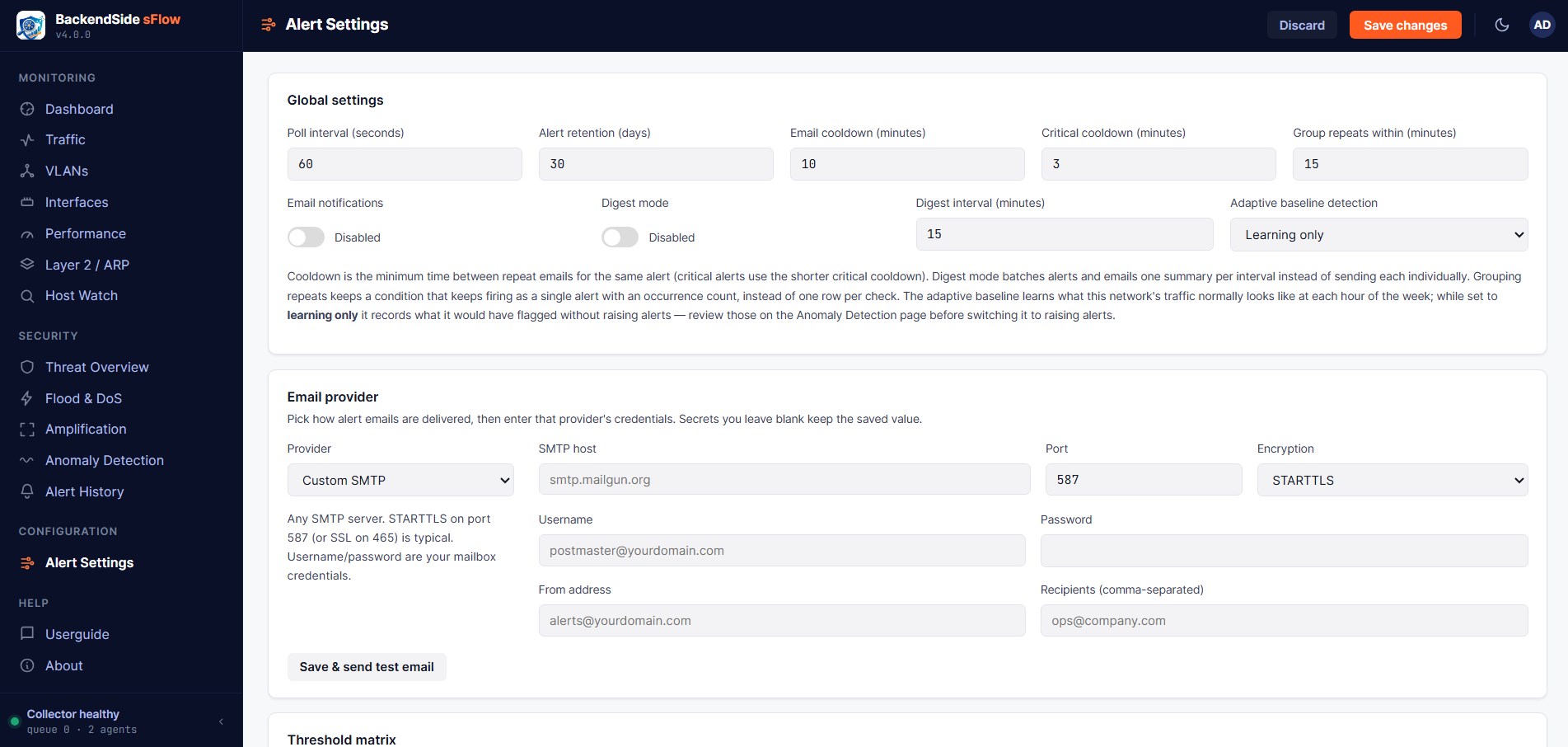
Alert Settings — email/SMTP delivery, cooldowns, digests and threshold tuning
Latest Release
Version 4.0 — July 2026
Adaptive traffic baselines, an expanded flood / amplification / anomaly detection catalogue, deduplicated alerts with email delivery and Host Watch, a live desktop control panel, and HTTPS by default — on top of the full sFlow v5 analytics suite.