
Process & Port Analyzer – Network & Process Monitor for Windows
A free Windows utility for deep inspection of running processes, active TCP/UDP connections, listening ports, Windows Firewall rules, and live packet capture — all using native Windows APIs, no third-party libraries required.
Download Desktop/Server Version 3.2
Free on the Microsoft Store — no subscription, no ads.

Features
⚙️ Running Process Viewer
Lists all running processes with PID, process name, and full executable file path. Double-click any process to open a detailed module view showing every DLL and file loaded by that process, with full paths.
🔌 Active TCP/UDP Connections
Displays all active TCP and UDP connections in real time — showing PID, protocol, local IP/port, remote IP/port, connection state (e.g. ESTABLISHED, TIME_WAIT), process name, and full executable path.
👂 Listening Ports Viewer
Shows all TCP and UDP ports currently in a listening state, including the owning PID, process name, and full file path — making it easy to identify which services are accepting inbound connections.
📡 Packet Sniffer
Built-in raw packet sniffer using native Winsock APIs in promiscuous mode. Captures and decodes TCP, UDP, ICMP, and IGMP packets — showing protocol, source/destination IP and port, packet size, TTL, and TCP flags (SYN, ACK, FIN, RST, etc.).
🔎 Packet Filtering
Filter captured packets by source IP, destination IP, source port, and destination port. Only matching traffic is displayed — making it easy to isolate specific connections in a busy network.
💾 Packet Hex Dump
Optionally save captured packets to a dump.log file with timestamped entries showing protocol, source/destination, packet size, and a full hex + ASCII side-by-side dump of each packet's raw content.
🛡️ Windows Firewall Rule Manager
View, create, enable, and disable Windows Firewall rules directly from the app. Create inbound or outbound rules for TCP, UDP, ICMP, or any protocol, with specific local/remote IPs and ports — or block a connection with one right-click.
🚫 Block Connection from Context Menu
Right-click any active connection and choose "Block this connection" to instantly open the firewall rule creator, pre-filled with the connection's IP, port, and protocol — creating a block rule in seconds.
🔃 Sortable Columns
All list views support column sorting — click any column header to sort ascending or descending. Numeric columns (like PID and port numbers) sort as integers, not text, for accurate ordering.
🔒 No External Dependencies
Everything runs on native Windows APIs — iphlpapi, psapi, Winsock2, and the Windows Firewall COM interface. No WinPcap, Npcap, or any third-party library required.
🚩 Suspicious-Process Detection
A Risk column flags processes as High or Medium using local, offline heuristics — unsigned binaries, system-name masquerading, running from temporary folders, self-deleted executables, sideloading, suspicious parent/child chains, command lines that leave nothing on disk, and risky network behaviour. Hover a flag to see exactly why it was raised. These are signals, not verdicts: plenty of legitimate software trips one. Everything is computed on your own machine.
⚡ One-Click Row Actions
Every row on Processes, Listening and Connections ends with action icons that mirror the right-click menu — build a full plain-text process report to paste into an AI assistant, block the port or connection, show the loaded modules, or end the process after a confirmation. Select several rows and End process ends all of them, listing exactly what will be closed.
🌍 Host Names & Locations
Right-click a connection and Resolve host name to look up the remote address’s DNS name. Optionally tick Geo-locate to fill in each remote address’s country and city. This is the only feature that sends anything off your machine — just the addresses you are connected to, to a lookup service. It is off by default and asks before the first use.
💾 It Remembers Your View
The tab you were on, the Processes filters, the protocol and state filters, column sort and column widths, and your auto-refresh interval are all restored the next time you open the app. Auto-refresh keeps your selected rows and scroll position, pauses while a dialog is open, and no longer re-runs the risk scan on every tick.
Common Uses
🕵️ Security Auditing
Identify unexpected outbound connections, suspicious listening ports, or unknown processes communicating on your network — without needing any external tools.
🖥️ Server Monitoring
Get a full picture of what's running and listening on a Windows server — ideal for system administrators checking service health or investigating unexpected activity.
🧑💻 Developer Network Debugging
Trace which ports your application is using, inspect raw TCP/UDP packets during development, and verify your app's network behaviour with the built-in packet capture and hex dump.
🔥 Firewall Troubleshooting
View all existing Windows Firewall rules in one place, enable or disable rules on the fly, and quickly create precise block or allow rules based on live connection data.
Screenshots
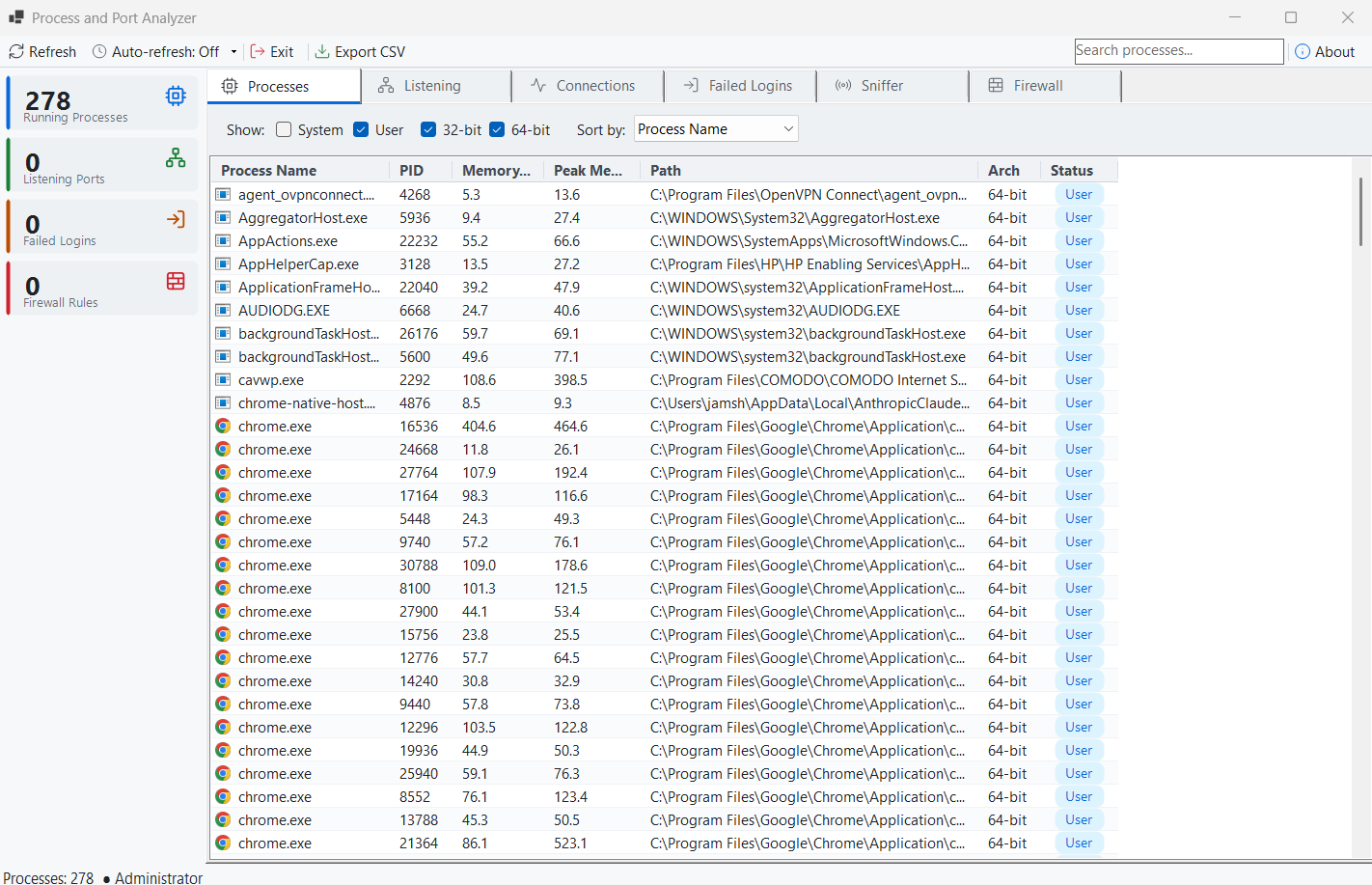
Running Processes
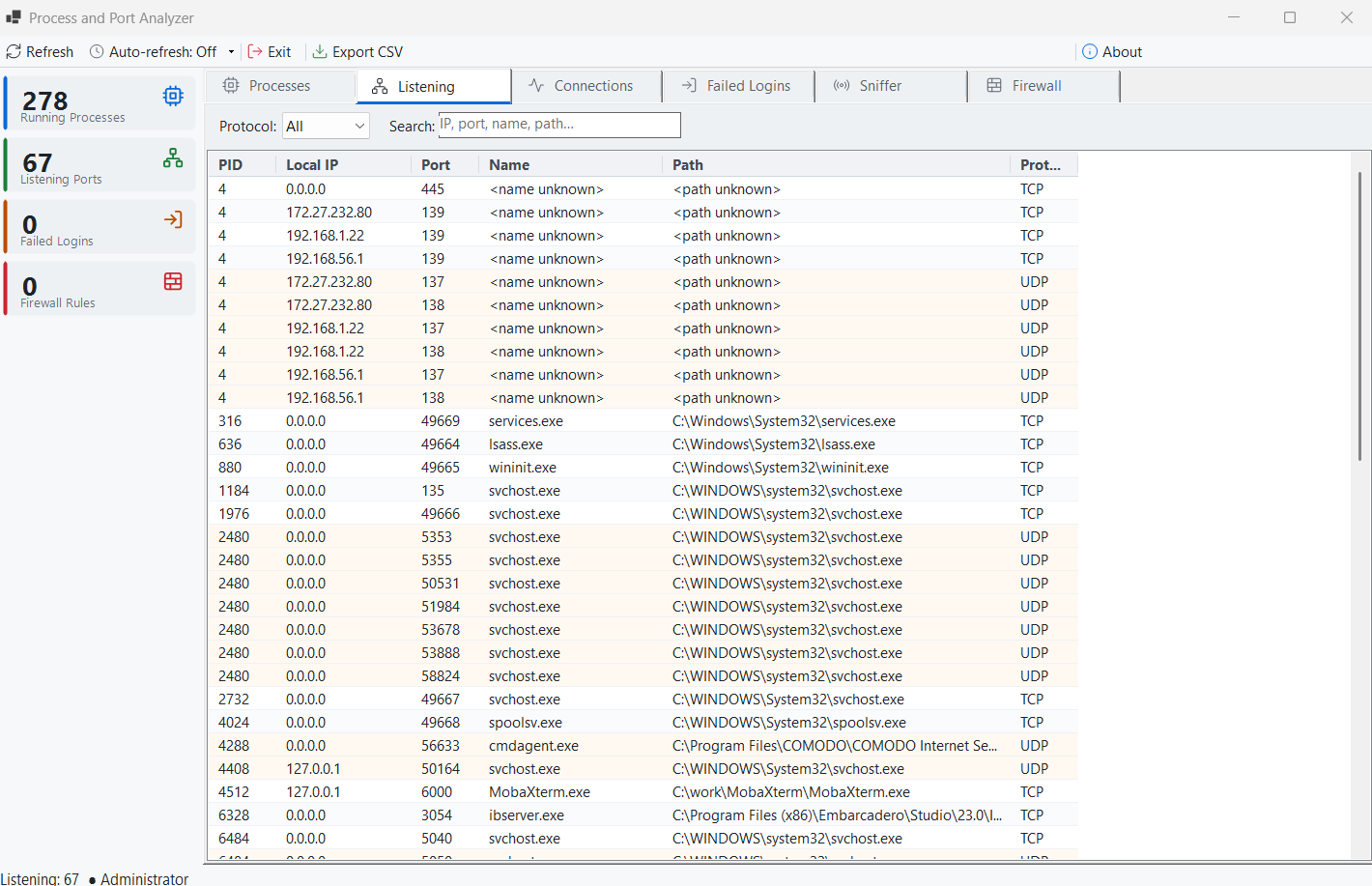
Listening Ports
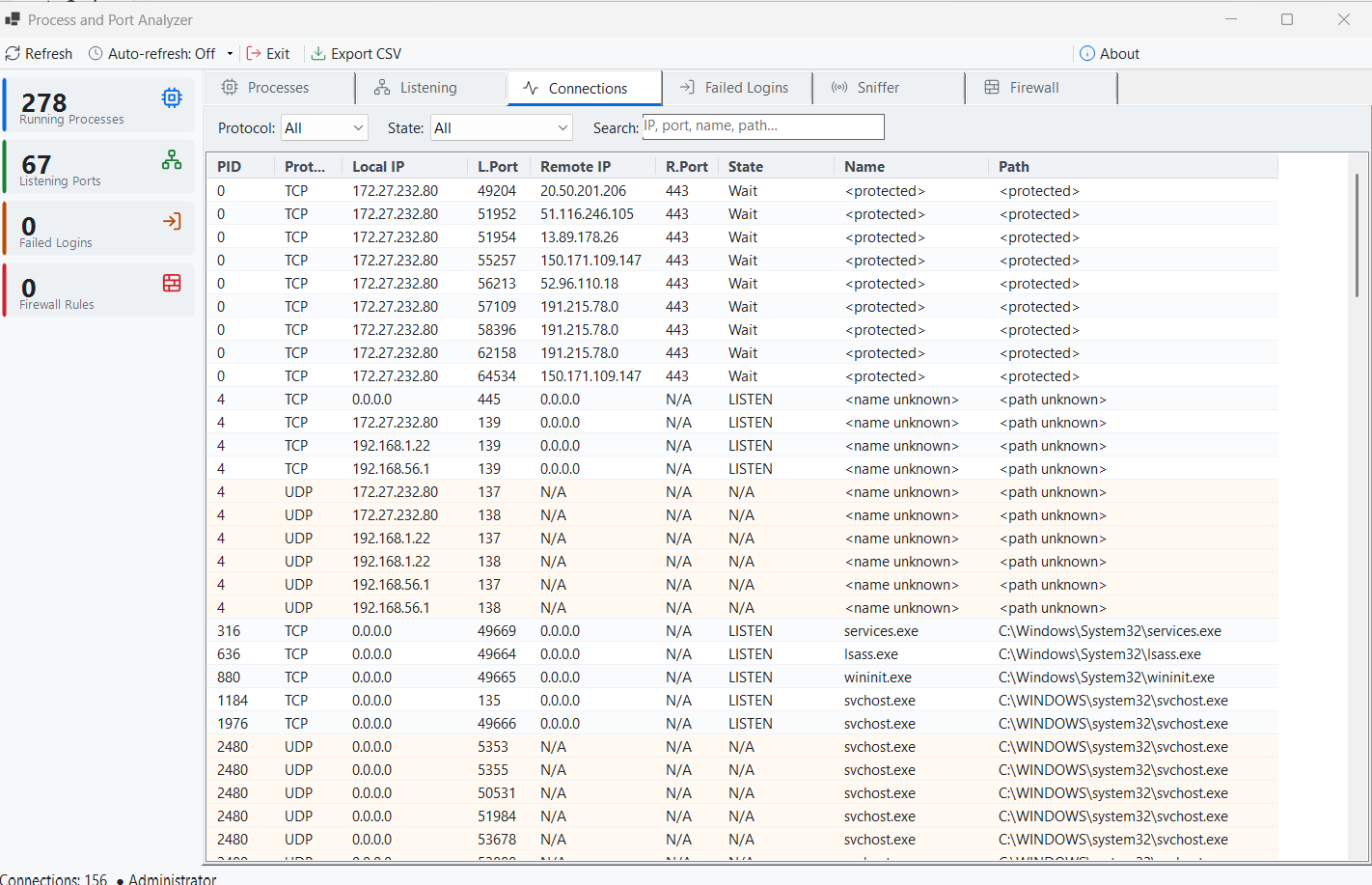
Active TCP/UDP Connections
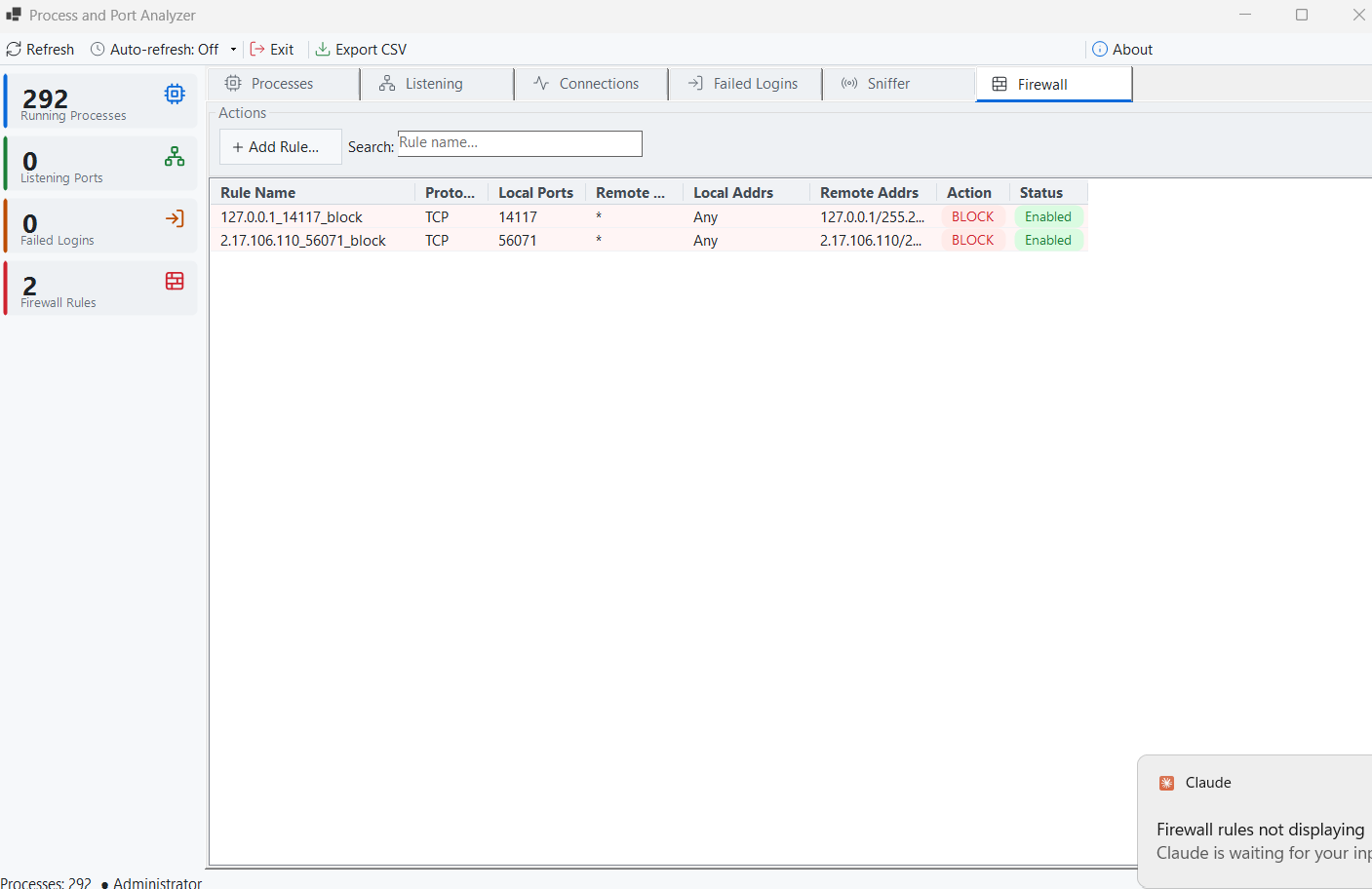
Firewall Rule Manager
Latest Release
Version 3.2 — September 1, 2026
Searching is instant — it filters what is already on screen rather than re-scanning the machine on every keystroke. Auto-refresh keeps your selection and scroll position, so a row no longer jumps away while you are reading it. “Block this connection” now creates a rule that actually blocks something, firewall rules are verified as this app’s own before being deleted, and failed sign-ins load in the background in your local time zone. Plus a “Flagged for Review” card, capture-log CSV export, ending several processes at once, and sharper rendering on high-resolution displays.